In this guide
Loyverse and LoungeOS are often on the same shortlist in Africa: both run on devices you already own, both are cheap to start, and both work in French and English. They are built for different businesses, though. This comparison sticks to facts we could check in each product’s own pages and help centre, in November 2026.
Disclosure: we make LoungeOS. Where Loyverse is the better choice, we say so.
The short answer
- Choose Loyverse if you run a single counter (a café, a small shop, a kiosk) with one or two staff, stable internet and no table service. The free plan is hard to beat.
- Choose LoungeOS if you run a bar, lounge, restaurant or snack with tables, a bar and a kitchen, several waiters, cash and mobile money to control, and internet that cuts during service.
Side by side
| Loyverse | LoungeOS | |
|---|---|---|
| Starting price | Free core POS | 14-day free trial, then 6,000 FCFA (US$10) a month |
| Staff roles and permissions | Paid add-on: Employee management, US$25/month per store | Included in every plan: 8 roles, manager PIN approvals, activity log |
| Advanced stock (purchase orders, valuation) | Paid add-on: US$25/month per store | Stock items, deliveries, waste, valuation and suppliers in every plan |
| Full sales history | Paid add-on: US$7/month per store | Included |
| Tables and floors | Open tickets and predefined tickets | Floors, tables with status, waiter sections, split by item, move, merge |
| Kitchen and bar screens | Kitchen display app | Separate kitchen and bar screens, routed by category |
| Selling without internet | Keeps selling; refunds disabled, stock levels hidden (Loyverse help) | Windows and Mac tills keep every function for up to 7 days, then sync |
| Mobile money | Custom payment types | MTN MoMo and Orange Money ready, with a transaction reference on each sale |
| Customer credit | Customer list and loyalty program | Customer tabs (pay later) with balances and part payments |
| QR table ordering | Not built in | Business and Pro plans |
| Accounting | Through integrations | Double-entry journals, P&L, balance sheet, cash flow (Business and Pro) |
| Several locations | Multi-store, add-ons priced per store | Branches on the Pro plan, one price |
| Phone app | iOS and Android | Android app with notifications by role and a widget; web app on iPhone |
Loyverse prices are from loyverse.com/pricing in November 2026 and can change. LoungeOS prices are on our pricing page.
Price: free is not always cheaper
Loyverse’s core POS costs nothing. The features a bar needs once it has a team are the paid ones. A venue that adds employee management, advanced inventory and full history pays about US$57 a month per store (roughly 34,000 FCFA). LoungeOS Business, which includes staff roles, stock, accounting, weekly reports and QR ordering for 5 users and 5 devices, is 15,000 FCFA a month. LoungeOS Pro, with unlimited users and branches, is 30,000 FCFA.
If you only need the free core, Loyverse wins on price. If you need control over staff and stock, LoungeOS usually costs less.
Internet cuts during service
Loyverse runs from the cloud and keeps a device selling when the connection drops. Its own help centre lists what stops: refunds, new customers, stock levels and negative-stock alerts, integrated card terminals, and the back office until the device syncs.
The LoungeOS Windows and Mac apps keep a full copy of the business on the till computer. During a cut, staff keep ordering, the kitchen and bar keep receiving tickets, payments, refunds, tabs and stock all work, and everything syncs when the internet is back. A till that has not synced for 7 days becomes read-only until it connects once. See selling offline.
Tables, bar and kitchen
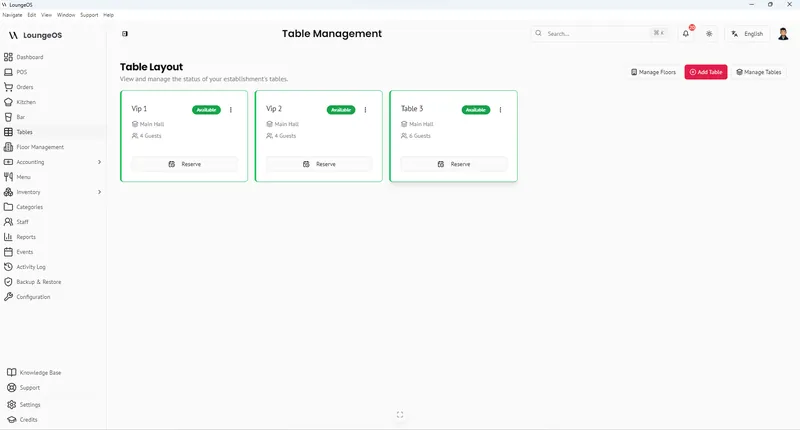
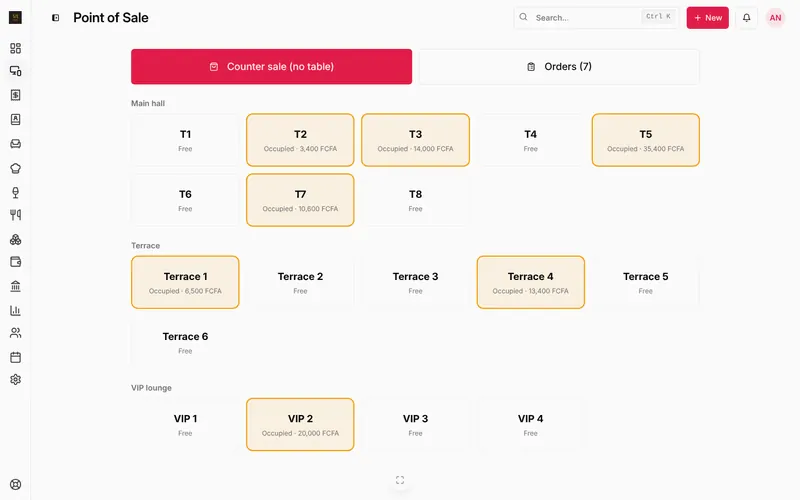
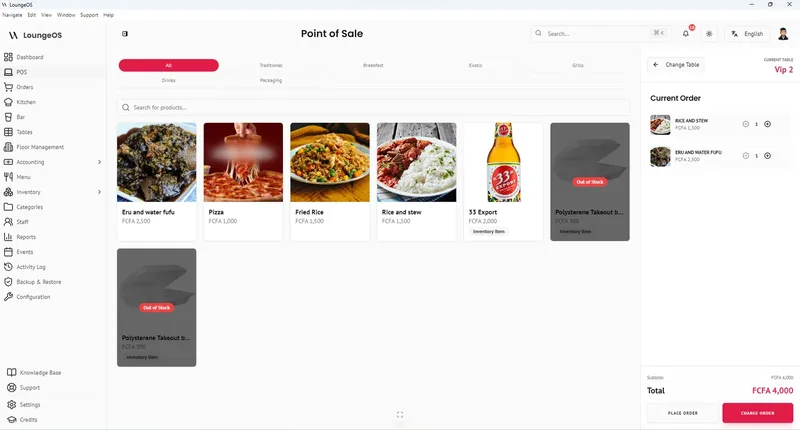
Loyverse handles service with open tickets, which is fine for a counter. LoungeOS starts every dine-in order from a table: floors (main hall, terrace, VIP), tables showing what they have ordered, waiter sections, notes, guests, split by item or in equal shares, move and merge. Food goes to the kitchen screen and drinks to the bar screen on their own.
Staff control and theft
In a busy bar, the money is lost in cancelled items, discounts and “the drink that never went on the bill”. In LoungeOS, removing a sent item, changing a price, cancelling, refunding or reopening a paid order needs a manager’s PIN, and the activity log records who asked and who approved. In Loyverse, access rights come with the Employee management add-on.
Money in Africa: mobile money, credit, FCFA
Both let you record MTN Mobile Money or Orange Money. LoungeOS can require a transaction reference for each method, so each MoMo payment can be matched against your statement, and customer tabs to replace the credit notebook. LoungeOS bills in FCFA by mobile money or card; Loyverse add-ons are billed in US dollars by card.
Where Loyverse is ahead
- iPhone and iPad apps. LoungeOS has an Android app; on iPhone you use the web app.
- Loyalty program and customer display are built in.
- Integrations and community. Loyverse has a large user base and many third-party integrations.
- Free forever for the basics, which matters for a new kiosk.
Switching from Loyverse to LoungeOS
- Export your items from the Loyverse back office to a spreadsheet.
- In LoungeOS, open Menu, press ⋮ next to Add Menu Item, download the CSV template, paste your items and import.
- Set each category to Kitchen or Bar, add your tables and staff, and run a quiet evening on both systems before you switch.
The help centre walks through each step: Add products and categories, Tables and floors, Add your team.
Frequently asked questions
Is LoungeOS free like Loyverse?
No. LoungeOS has a 14-day free trial with no payment up front, then plans from 6,000 FCFA a month. There is no free forever plan.
Does Loyverse work without internet?
Partly. It keeps selling and stores receipts on the device, but refunds are disabled, stock levels are hidden and integrated card terminals stop until it reconnects.
Which is better for a lounge or nightclub?
LoungeOS, if you have tables or VIP areas, a separate bar, several staff and frequent internet cuts. Loyverse suits a small bar with one counter and stable internet.
Run your next service on LoungeOS
Create your account, answer the setup wizard and your business is ready on day one. Try it free for 14 days with Business features. No payment up front.