Features
Everything you need to run service, stock and cash — in one offline system
LoungeOS replaces the cash register, the paper ticket book, the stock notebook and the spreadsheet your accountant rebuilds every month. Here is everything it does, and how each piece fits together.
30-day free trial · No credit card · Works without internet
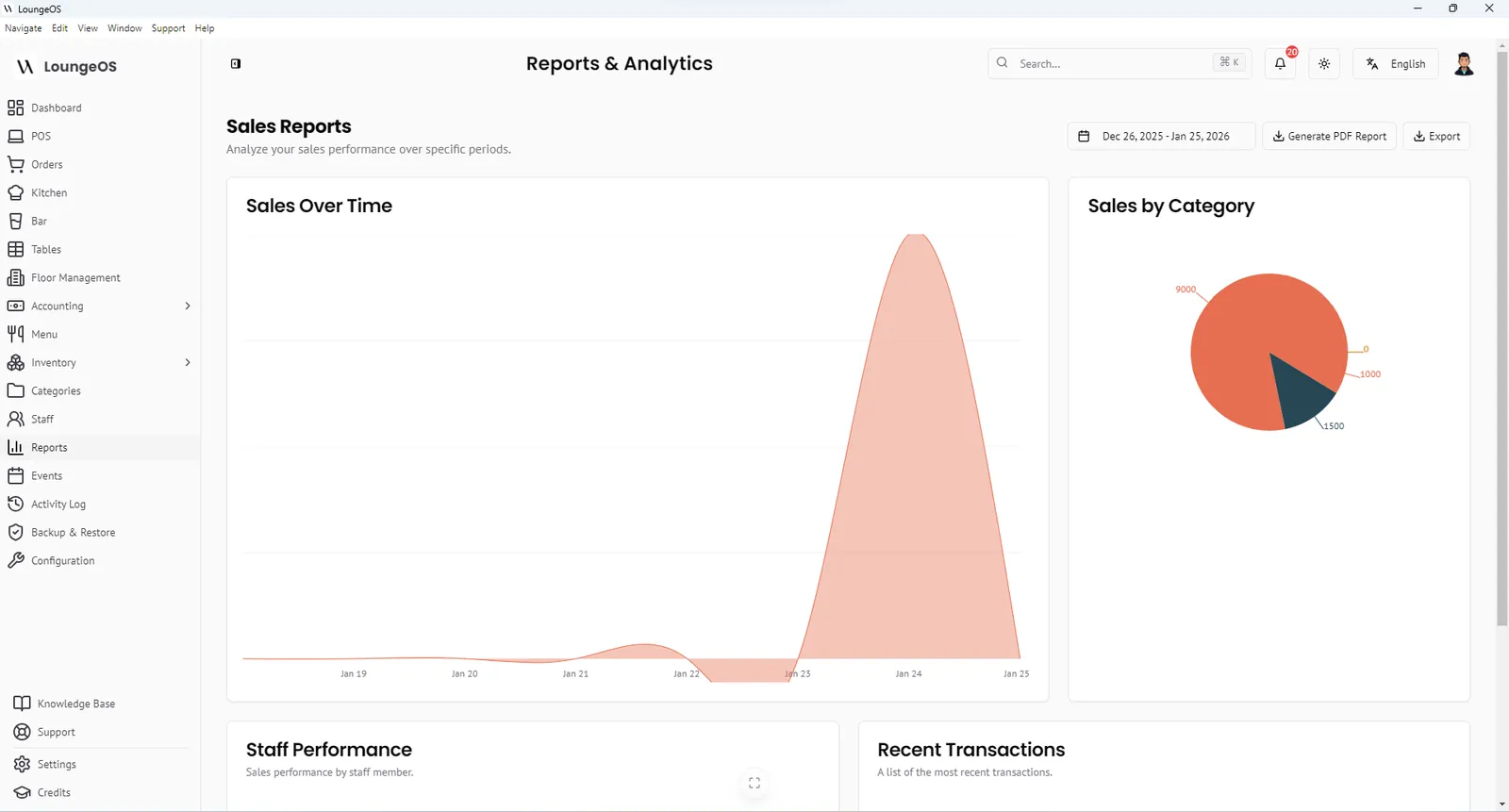
LoungeOS is an offline-first point of sale (POS) and management system for restaurants, bars, lounges, nightclubs, cafés and hotels. It installs on one Windows computer in your venue. Waiters, chefs, bartenders and cashiers then use any phone, tablet or PC on your Wi-Fi to take orders, see tickets and take payments. No internet connection is needed during service.
The table below is the short version. Each module has its own page with the details.
| Module | What it does | Who uses it |
|---|---|---|
| Point of sale | Fast touch ordering, item notes, discounts, split payments | Waiters, cashiers |
| Table & floor management | Live table status, floors, waiter sections, split and merge bills | Waiters, managers |
| Kitchen & bar displays | Food goes to the kitchen screen, drinks to the bar screen, automatically | Chefs, bartenders |
| Inventory | Stock items, suppliers, low-stock alerts, damage and waste logging | Stock manager |
| Loss prevention | 8 staff roles, manager-only voids and edits, activity log | Owners, managers |
| Mobile money & payments | Cash, card, MTN MoMo and Orange Money with references | Cashiers |
| Accounting | Double-entry journals, P&L, balance sheet, cash flow | Accountant, owner |
| Offline architecture | Everything above keeps working with no internet | Everyone |
How LoungeOS is built
Most cloud POS systems keep your data on a server abroad and treat the internet as a requirement. When the connection drops they fall back to a limited “offline mode”. LoungeOS works the other way round. The main computer in your venue is the server. Your phones and tablets connect to it over your own Wi-Fi router, so orders move between the floor, the kitchen and the bar even when your internet provider is down.
That design has three practical consequences:
- Service never stops for a network outage. Ordering, kitchen tickets, payments, stock and reports all keep running.
- You do not buy proprietary hardware. Any modern browser on a phone, tablet or laptop becomes a terminal. There is no per-device fee, and terminals are unlimited on every plan.
- Your data stays on your premises. Sales and stock live in a local database on your computer, and you can make encrypted backups.
Point of sale and ordering
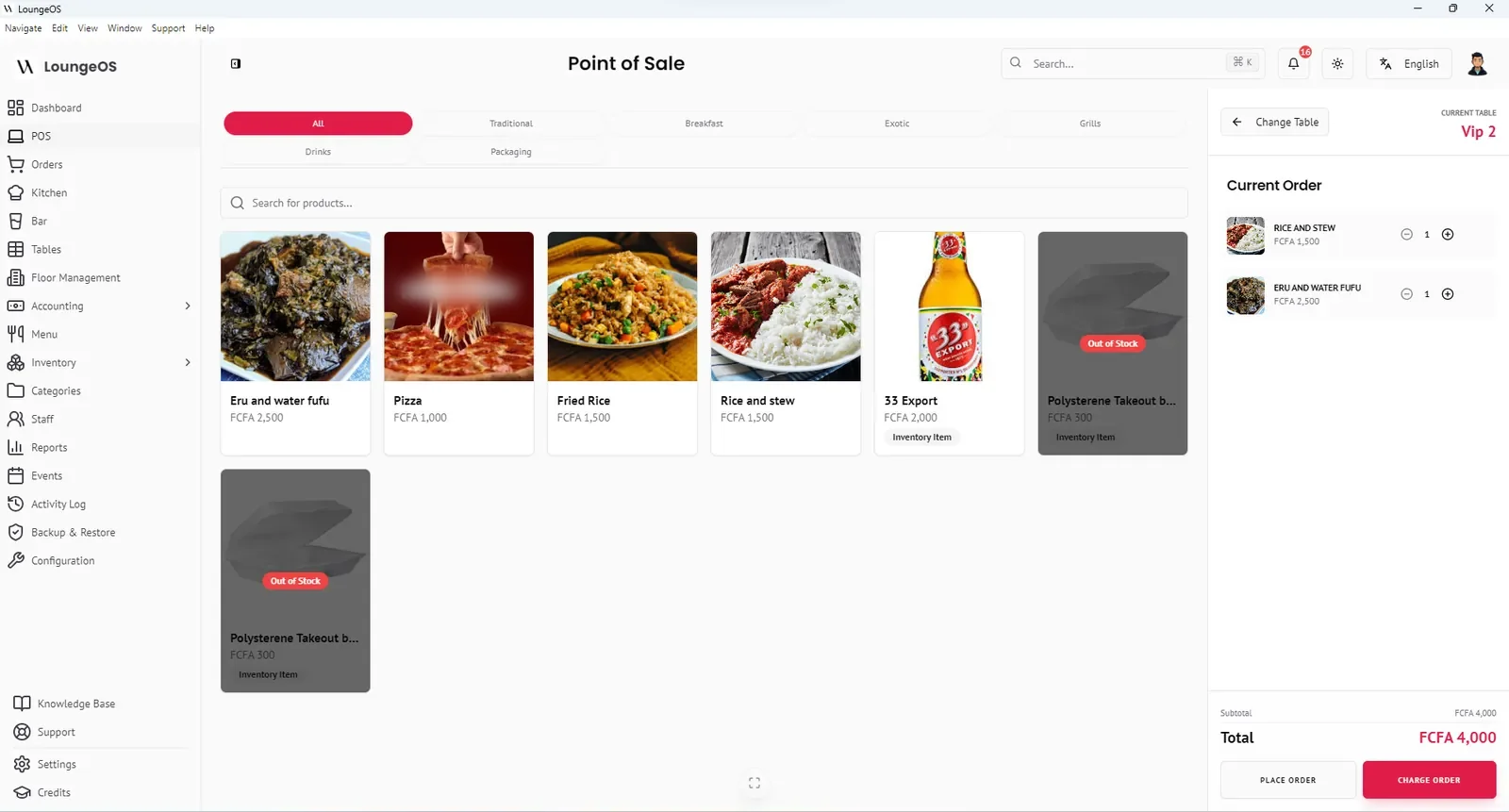
- Fast, visual ordering. Products appear as photo tiles grouped by category, with a search bar. Out-of-stock items are greyed out automatically so waiters cannot sell what you do not have.
- Preparation notes such as “medium-rare” or “no ice” travel with the item to the right screen.
- Variations (single/double, small/large) with their own prices.
- Discounts as a percentage or a fixed amount, from rules you define, so staff cannot invent their own.
- Split payments across cash, card and mobile money on the same bill.
- Receipts print on your thermal printer with your logo, address and custom thank-you message.
Tables, floors and waiter sections
Create your floors (main room, terrace, VIP mezzanine), add tables with seat counts and assign waiters to floors. Tables show their status by colour: green for available, red for occupied, orange for reserved or needing cleaning. A waiter only sees the tables on their own floor. Read more about table management →
Kitchen Display System (KDS) and Bar Display System (BDS)
Each menu category is marked as food or drink. When an order is placed, food items appear on the kitchen screen and drink items on the bar screen, in the same second, with an audio alert. Cooks move tickets from Pending to In progress to Ready, and the waiter is notified when the order can be picked up. Read more about the KDS →
Inventory and suppliers
Track every stock item with SKU, unit, cost, minimum and maximum levels and supplier. Record deliveries (stock in), breakage, spoilage and losses (stock out) and cost corrections. The inventory dashboard shows total stock value, low-stock warnings, out-of-stock items and a timeline of movements. Import and export with CSV. Read more about inventory →
Staff permissions and audit trail
LoungeOS has eight built-in roles: Super Admin, Manager, Accountant, Stock Manager, Chef, Waiter, Cashier and Bartender. Each sees only the screens their job needs. Removing items from a sent order, splitting and merging bills, and reactivating cancelled orders need a manager. Every login, failed login, cancellation (with its reason), stock adjustment and configuration change is written to an activity log you can search and export. Read more about loss prevention →
Payments and mobile money
Record cash with automatic change calculation, card or bank transfer payments, and mobile money (MTN Mobile Money and Orange Money) with the transaction reference. Groups can split one bill across several methods. Read more about payments →
Accounting and reports
The sales and analytics dashboards show revenue, daily sales, sales by category, staff performance and recent transactions. For the finance side, LoungeOS keeps a double-entry ledger with a chart of accounts. One click on Sync Accounting Data turns paid orders and stock purchases into balanced journal entries. You get an income statement (P&L), balance sheet and cash-flow statement, exportable to PDF or CSV. Read more about accounting →
Configuration that fits your country
- Currencies: XAF (FCFA), USD, EUR, GBP, NGN and GHS are built in, and you can add any other currency. You choose whether the symbol goes before or after the amount.
- Taxes: define several tax rates (for example VAT at 19.25% in Cameroon or 7.5% in Nigeria) and set the default for checkout.
- Languages: the app interface is available in English and French.
- Branding: your business name, address, logo and login-screen photos.
Security, backups and support tools
Inactive sessions log out automatically after two hours. You can download an encrypted backup of your whole database and restore it on a new computer if hardware fails, and automatic backups can be scheduled. An internal ticketing system lets staff report equipment problems such as a broken printer or freezer, with priority and assignment.
Frequently asked questions
Does LoungeOS need internet to work?
No. LoungeOS runs on your local network. You need internet once to create your account and activate your licence. After that, orders, kitchen and bar screens, payments, stock and reports all work without internet.
What devices can I use as terminals?
The host must be a Windows 10 or 11 computer with at least 4 GB of RAM. Waiters, chefs and cashiers can use any phone, tablet or computer with a modern web browser on the same Wi-Fi network. There is no limit on the number of terminals.
Is LoungeOS only for restaurants?
No. It is used by restaurants, bars, lounges, nightclubs, snack bars, cafés and hotel food-and-beverage outlets. Any business that sells food or drinks to tables or at a counter can use it.
Can I try every feature before paying?
Yes. The 30-day free trial includes every feature with unlimited terminals, and no credit card is required. See pricing.
Run your next service on LoungeOS
Install LoungeOS on a Windows computer, connect your tablets and phones over Wi-Fi, and run real service for 30 days. Free, no credit card.
Explore more
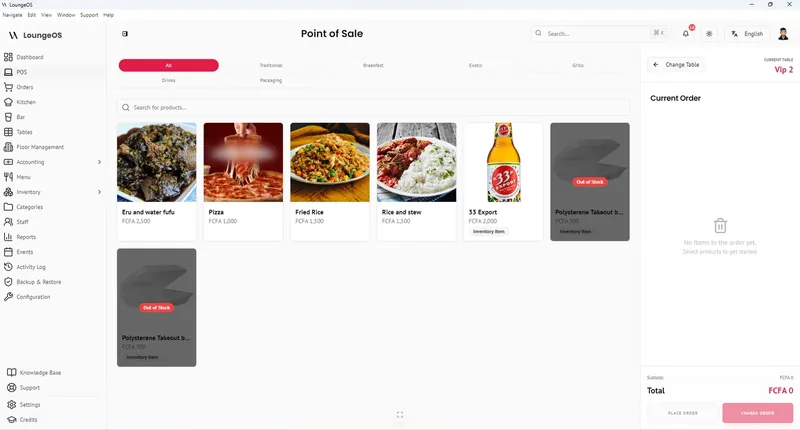
Offline POS
Orders, kitchen screens, payments and stock keep running on your local Wi-Fi with no internet.
Learn more →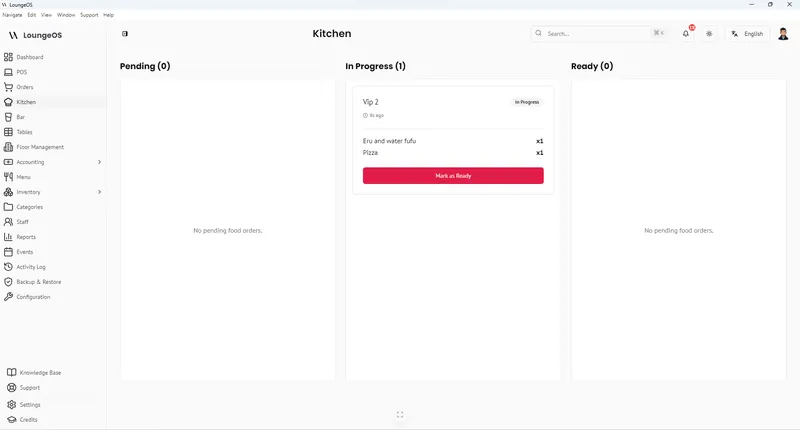
Kitchen & Bar Display System
Food goes to the kitchen screen, drinks to the bar screen, with audio alerts and Pending → Ready columns.
Learn more →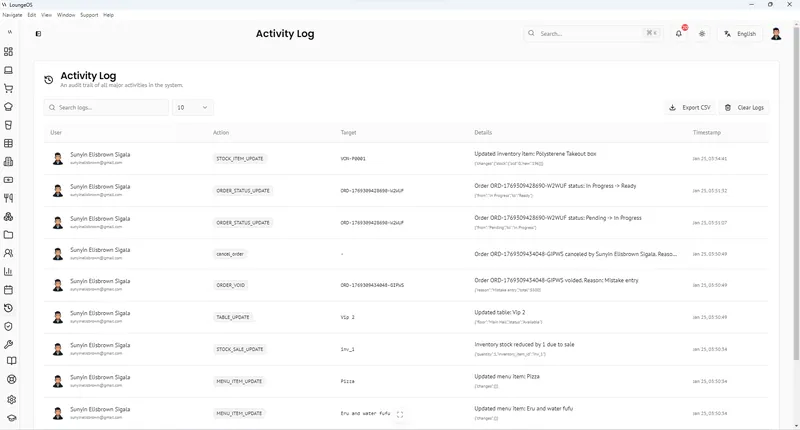
Loss Prevention & Audit Log
Eight staff roles, manager-only edits, cancellation reasons and a searchable activity log.
Learn more →