The POS and business app for every business that sells.
Restaurants, bars, lounges, cafés, nightclubs, hotels, retail shops and supermarkets run on LoungeOS. Sell at the till, send orders to kitchen and bar screens, track stock and expenses, and keep your accounts, in the browser or in the Windows, Mac and Android apps. The Windows and Mac apps keep selling when the internet is down.

Built for Every Business That Sells
Who is LoungeOS For?
...plus nightclubs, fast food, boutiques, mini-markets and any business that sells.
The Reality
Traditional Ways Are Costing You
Running a business with the wrong tools leads to invisible losses, lack of traceability, and zero insights into what’s actually happening.
Encourages Theft
Without strict permission gates, staff can freely delete items or void tickets without managers ever knowing. The cash drawer leaks slowly every single day.
Prevents Traceability
When an error happens or cash goes missing, traditional registers offer no comprehensive audit logs. Accountability becomes completely impossible.
Blind Operations
You can't see your business performing at a glance. Without data on peak hours or top-selling items, you are guessing instead of managing.
How It Works
From table to kitchen. Instantly.
Phones, tablets, tills and kitchen screens all see the same orders. With the Windows or Mac app, phones and tablets on the same Wi-Fi keep working through their browser when the internet is down.
Waiters
Take orders on a phone or tablet right at the table.
Kitchen
Food orders appear on the kitchen screen. No lost paper tickets.
Bar
Drink orders appear on the bar screen.
Cashier
Takes payment with your own payment methods and prints the receipt on 58 mm or 80 mm paper, or as a PDF.
Admin
Follows sales, stock, expenses and reports from the browser or the apps.
The Fix
Six Problems. One Platform.
LoungeOS puts your sales, stock, money and staff in one place, so you can run a tighter, more profitable business.
Clear Reports
Daily, weekly and monthly reports show what sells and when, so you can set prices and plan your shifts with real numbers.
Know what really sellsAnti-Theft Protection
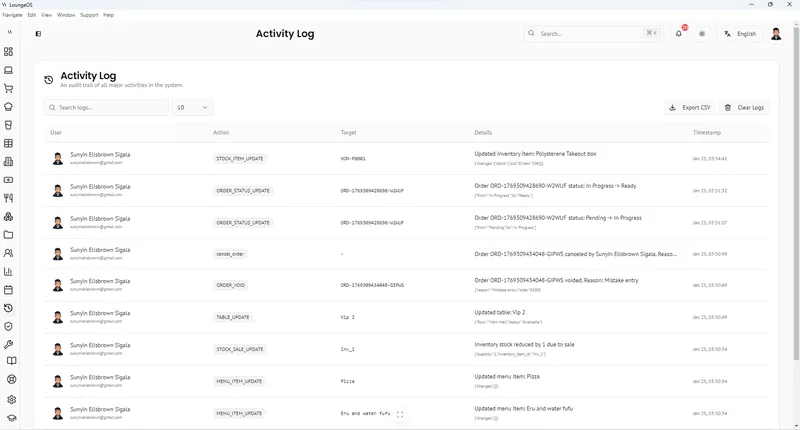
Roles and permissions decide who can do what, and the activity log records every action with a name.
Every action has a nameStaff & Roles
Invite staff by email and give each person a role. On a shared till, they switch with a quick PIN.
Everyone has their own loginExpenses & Accounting
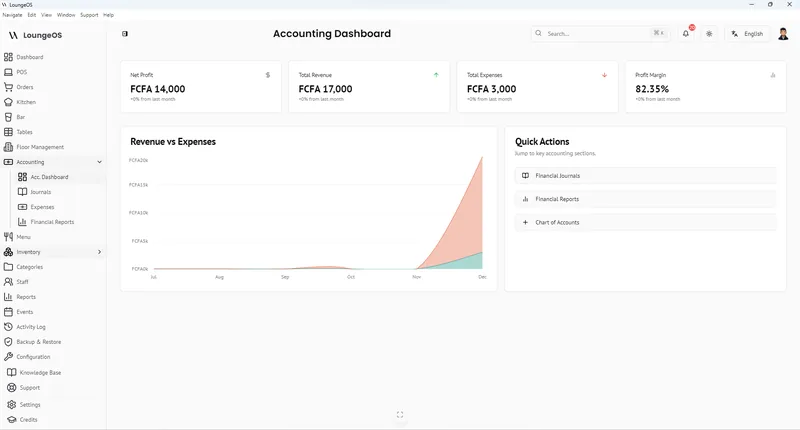
Record expenses in categories you create (common ones are made for you), and keep your books with a chart of accounts and a journal.
Know your real profitBring Your Own Hardware
Use the web app in any modern browser, or the Windows, Mac and Android apps. Touch or mouse, phone or big screen.
Save on setup costsKeeps Selling Offline
The Windows and Mac apps keep your data on the computer, keep selling without internet and sync when the connection comes back.
Outages don't stop serviceKey Features
The Full Arsenal: Built for Operators Who Mean Business
You don't need a cash register. You need a command center. LoungeOS shows you every sale, every payment and every stock movement, and who made it.
Setup Wizard
Answer a few questions: business type, name, logo, currency, taxes, payment methods and opening hours. Tick the suggested menu, inventory and expense categories, and LoungeOS is configured on day one.
One Account, Google Sign-In
Each person has one LoungeOS account, with email and password or Continue with Google. The same account works on the web, Windows, Mac and Android. No keys, no codes to copy.
Offline Selling & Sync
Windows and Mac tills keep selling without internet and sync automatically when the connection comes back. Phones and tablets on the same Wi-Fi keep working through their browser.
Payments & Receipts
Create your own payment methods: cash, MTN Mobile Money, Orange Money, card, bank transfer and more. Print receipts on 58 mm or 80 mm thermal printers, or as PDF, from any order.
Expenses & Accounting
Record expenses in categories you create, with common ones made for you. A chart of accounts and a journal keep your books, and reports show where the money goes.
Backups & Staff Roles
A cloud copy of all your data with daily full backups. Logos, images and documents are stored securely in the cloud. Each staff member gets a role and permissions, and the activity log shows who did what.
See full feature list
Real Results
Owners Who Took Back Control
These aren't just testimonials, they're before and after stories of businesses that stopped bleeding money and started scaling.
"Before LoungeOS, we couldn't track inventory losses. The strict permission controls and detailed activity logs stopped unauthorized voids overnight. We're saving hundreds of thousands every week."
"Training new staff used to take days. The LoungeOS till is simple enough that new hires are up to speed in 15 minutes."
"Happy hour used to be a free-for-all. Now cashiers can only apply the discounts we set up, and VAT is on every bill."
Gallery
See LoungeOS in Action
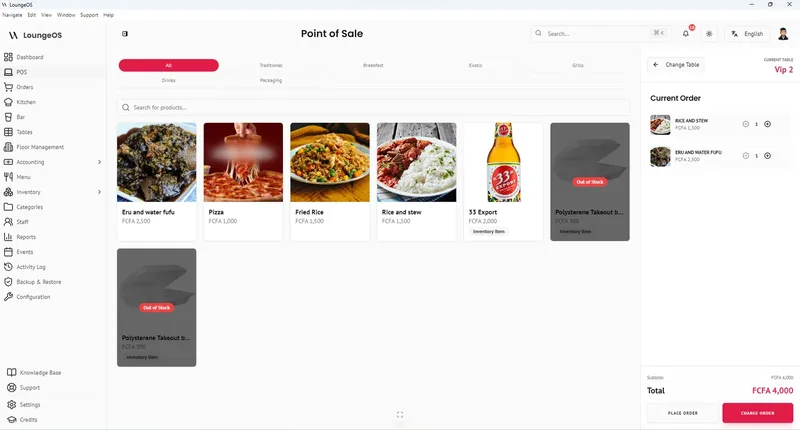
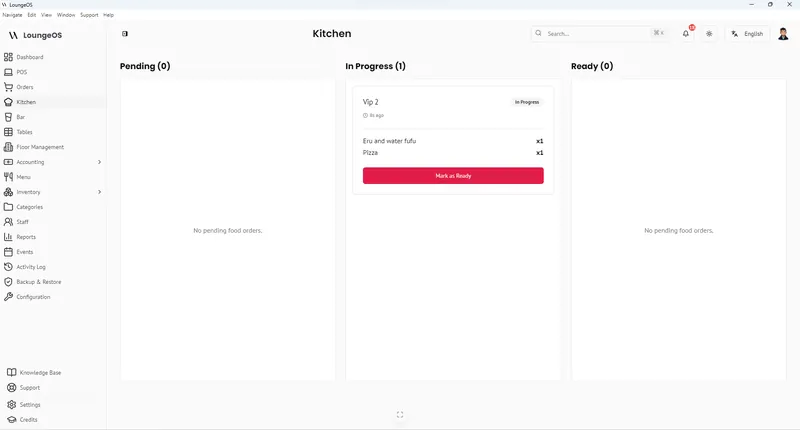
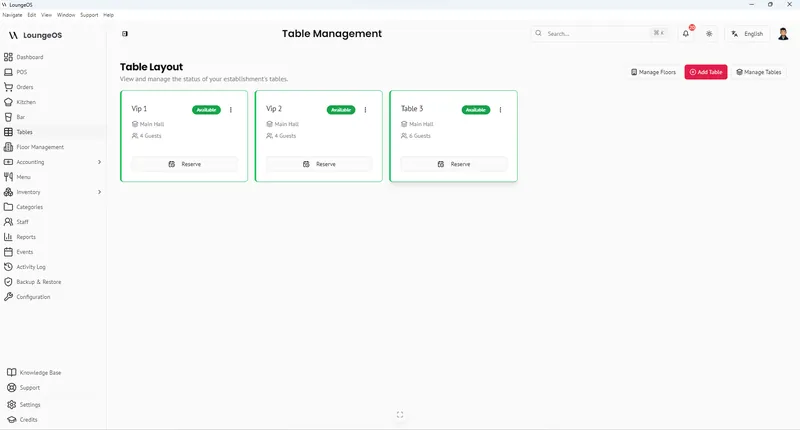
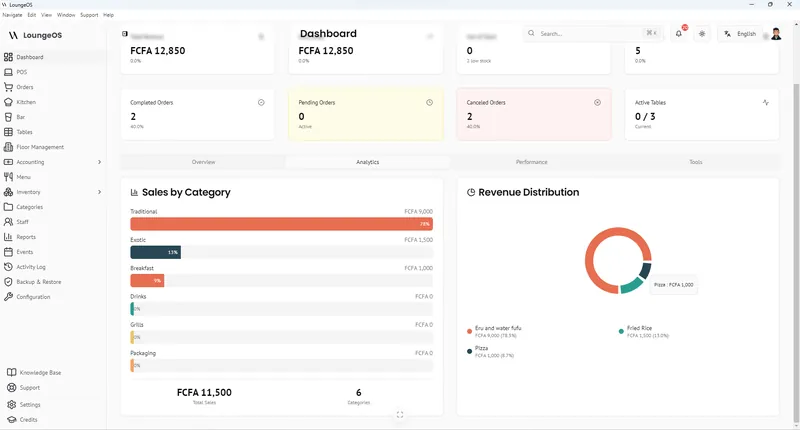
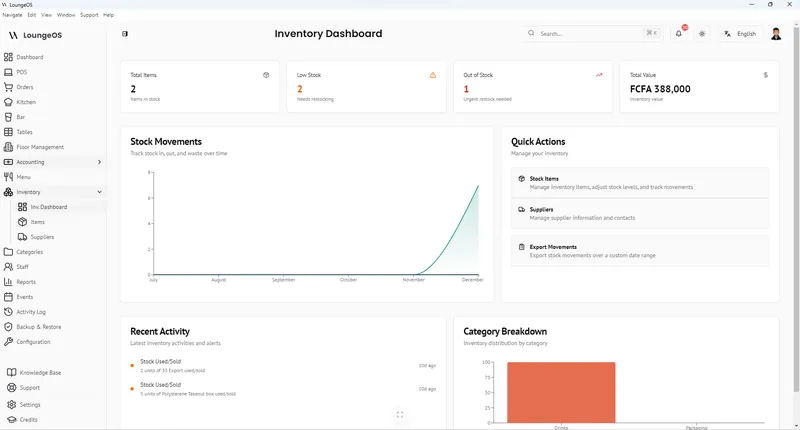
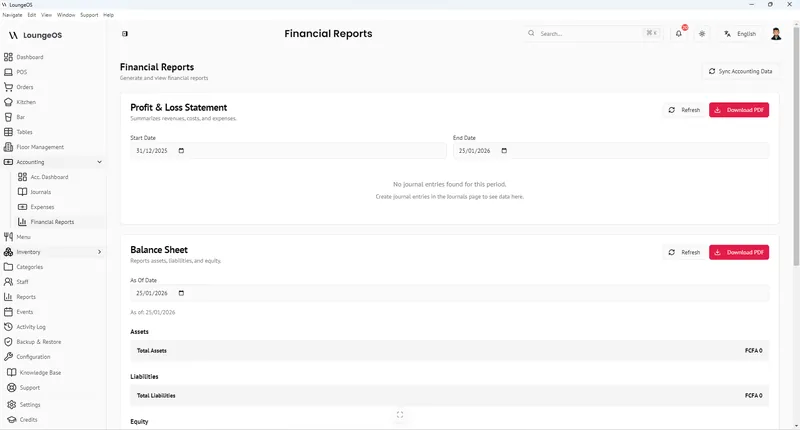
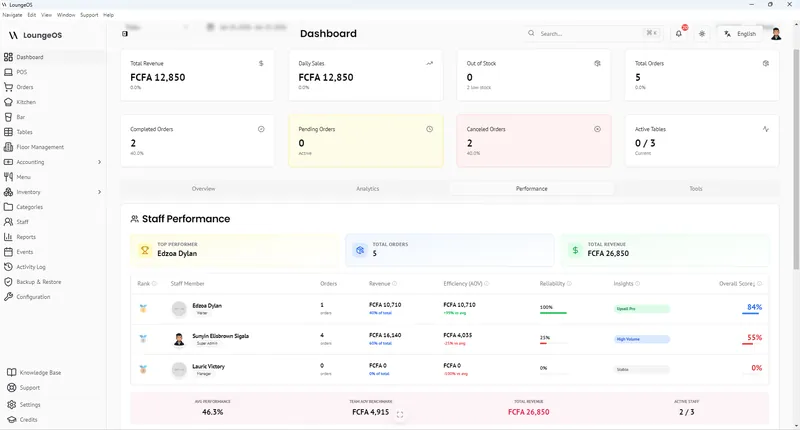
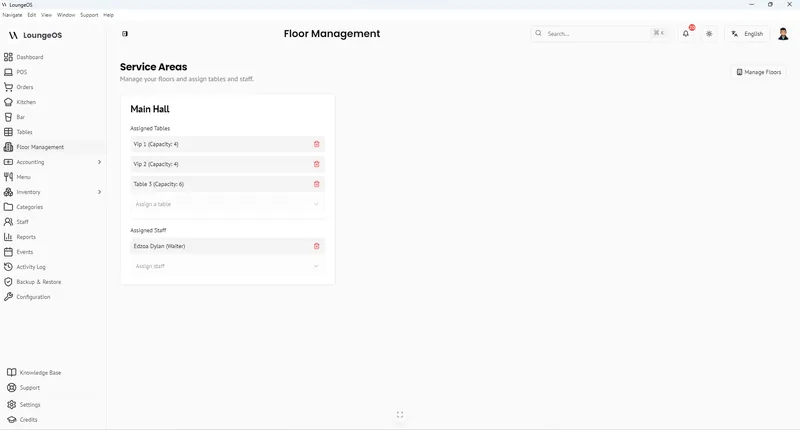
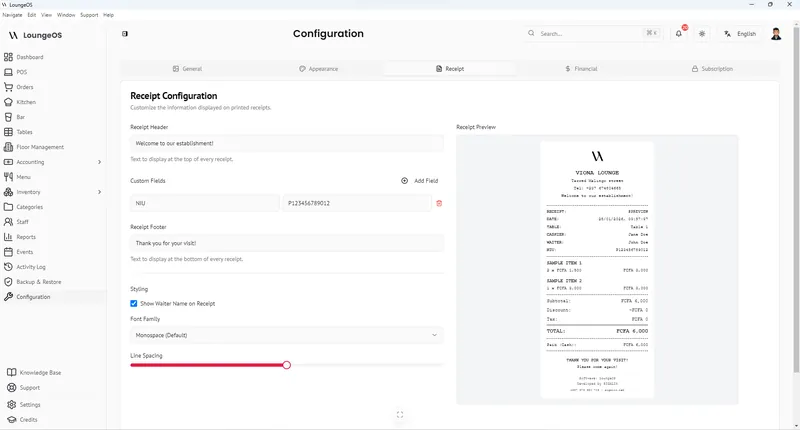
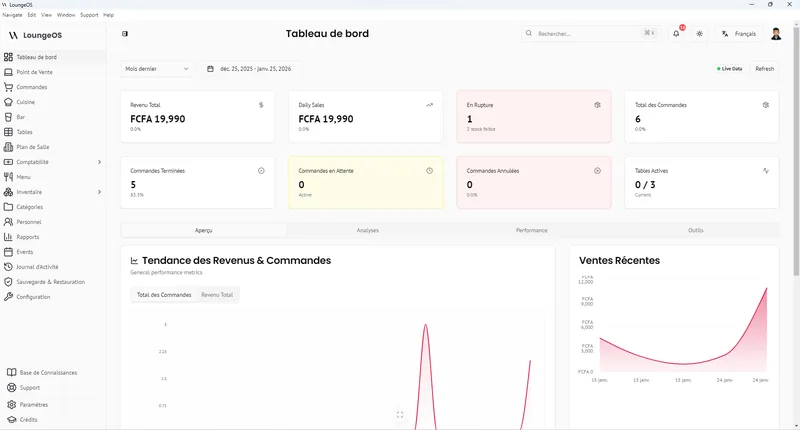
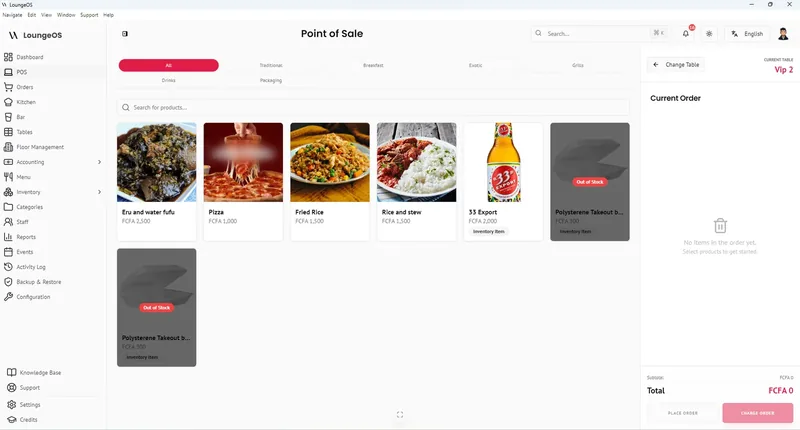
A look inside LoungeOS: the till, kitchen screen, stock, accounting and reports.
Experience LoungeOS
See LoungeOS Transform Your Business Live
Book a 1-on-1 demo with our team. We'll show you how LoungeOS fits your business, from the first sale to the end-of-day report.
Simple Pricing
Three Plans. Same Features in Every Currency.
Every plan starts with a 14-day free trial with Business features. No payment up front. Pay yearly and get 2 months free.
Starter
- 2 users, 2 devices
- Point of sale (POS)
- Inventory
- Receipts
- Daily reports
Business
- 5 users, 5 devices
- Everything in Starter
- Expenses and accounting
- Shifts and cash control
- Weekly and monthly reports
- Email alerts
Pro
- Unlimited users, 10+ devices
- Everything in Business
- Priority support
- Advanced admin
- Several branches (coming soon)
- Payroll (coming soon)
Download · Version 2.0
Download LoungeOS for Windows, Mac and Android
Every app uses the same LoungeOS account: install it, open it and sign in. Or open the web app in any modern browser, with nothing to install.
Windows
Windows 10 & 11 (64-bit)
Sells offline and syncs when back online
Mac (Apple Silicon)
M1 and later
Sells offline and syncs when back online
Mac (Intel)
Intel processor
Sells offline and syncs when back online
System requirements, installation and sign-in steps for every app →
Easy Setup
Ready on Day One.
Five simple steps to get your business running on LoungeOS.
Create Your Account
Go to app.loungeos.app and create your account with your email and password, or click Continue with Google. Sign-up is on the sign-in page.
Answer the Setup Wizard
Tell LoungeOS your business type, name, logo, currency, taxes, payment methods and opening hours.
Tick Your Categories
Pick from the suggested menu, inventory and expense categories, then add your products and prices.
Use It Where You Work
Keep working in the web app, or install the Windows, Mac or Android app and sign in with the same account. No keys, no codes to copy.
Invite Your Staff
Invite staff by email and give each person a role. On a shared till, they switch with a quick PIN.
Built in Cameroon, used across Africa
Set up for your country
Your own currency and taxes, mobile money as a payment method, and English or French, with a page for each market.
From the blog
Guides for owners and managers
Best offline restaurant POS systems in 2026
LoungeOS, SambaPOS, Toast, Square and Loyverse compared on what keeps working without internet.
Read guide →
Restaurant employee theft: 12 schemes and fixes
Voids, under-ringing, fake comps, sweethearting and fake mobile money, and how to stop each.
Read guide →
How to accept mobile money in your restaurant
Merchant accounts, a fraud-proof checkout routine and daily reconciliation for MoMo and Orange Money.
Read guide →FAQ
Frequently asked questions
LoungeOS is point of sale (POS) and business management software for every kind of business that sells: restaurants, bars, lounges, cafés, nightclubs, hotels, retail shops, supermarkets and more. It handles sales, tables and orders, kitchen and bar screens, payments, receipts, inventory, expenses, accounting, staff roles and reports, in English and French.
LoungeOS runs in any modern browser at app.loungeos.app, and as apps for Windows 10 and 11 (64-bit), Mac (Apple Silicon and Intel) and Android 6.0 or later. You use the same LoungeOS account on all of them. Download LoungeOS.
Yes, in the Windows and Mac apps. They keep your business’s data on the computer, keep selling without internet and sync automatically when the connection comes back. Phones and tablets on the same Wi-Fi can keep using the desktop app through their browser. After 7 days without syncing, the till becomes read-only until it reconnects, and a warning shows during the last 2 days. The web app and the Android app need internet. How offline mode works.
Starter costs US$10 a month (6,000 FCFA), Business US$25 a month (15,000 FCFA) and Pro US$50 a month (30,000 FCFA). Pay yearly and you get 2 months free: US$100, US$250 or US$500 a year (60,000, 150,000 or 300,000 FCFA). Visitors in Cameroon see prices in FCFA, everyone else in US$. Every plan starts with a 14-day free trial with Business features, with no payment up front. See pricing.
Create your account at app.loungeos.app with your email and password, or click Continue with Google. A setup wizard asks for your business type, name, logo, currency, taxes, payment methods and opening hours, then suggests menu, inventory and expense categories to tick, so LoungeOS is configured on day one. In the Windows, Mac and Android apps, you sign in with the same account. There are no keys or codes to copy.
You manage your plan, invoices and payments at account.loungeos.app. You can pay with Mobile Money (MTN, Orange), card or PayPal. The amount is charged in FCFA, and US$ prices are shown converted. Invoices and receipts arrive by email. Billing questions: billing@sigalix.com.
LoungeOS becomes read-only, on the web and on your tills, until you renew. You can still see past orders and reports, print and export, but you can’t make new sales or edits. Nothing is ever deleted.
It removes the usual opportunities. The owner invites each staff member by email and gives them a role with its own permissions, so people only do what their role allows. On a shared till, staff switch with a quick PIN, and every action is written to the activity log with a name. Loss prevention features.
Yes. Each business creates its own payment methods, such as cash, MTN Mobile Money, Orange Money, card or bank transfer, and the cashier picks the right one for each payment. Payments and mobile money.
The devices you already have: a Windows or Mac computer, an Android phone or tablet, or any device with a modern browser. LoungeOS works with touch and mouse on any screen size. Receipts print on 58 mm and 80 mm thermal printers, or as PDF. Read the hardware guide.
The app is available in English and French. You choose your currency and your taxes in the setup wizard.
LoungeOS keeps a copy of all your data in the cloud and makes daily full backups. Logos, images and documents you upload are stored securely in the cloud. The Windows and Mac apps also keep your business’s data on the computer. Each staff member only sees what their role allows, and the activity log shows who did what.
Yes, by email at support@loungeos.app and by phone on +237 679 690 703, in English and French. For other questions, write to info@sigalix.com. See also the knowledge base and documentation.