Supermarket POS
A supermarket POS that keeps the queue moving and the shelves counted
Scan, pay, next customer. LoungeOS gives every cashier a fast barcode till, keeps every product's stock count and shows you each till's takings, even when the internet is down.
14-day free trial · No payment up front · Sells offline on Windows and Mac
Need help installing or setting up LoungeOS for your business? Message or call us on WhatsApp +237 679 690 703 (call)

Sound familiar?
Thousands of products, a long queue and cash from every till
Queues at the checkout
Typing prices by hand is slow and full of mistakes. Customers leave their basket and walk out.
Shelves that are empty or overstocked
Without stock counts, best sellers run out while slow items gather dust in the store room.
Tills that don't balance
Several cashiers, several tills, and at closing nobody can say which one is short.
What LoungeOS does for you
What a supermarket or grocery needs every day
Barcode checkout
Scan with any USB or Bluetooth scanner, or type the code and press Enter. Each barcode belongs to one product.
Several tills and cashiers
Each cashier has their own account and PIN. Starter covers 2 devices, Business 5 and Pro 10 or more.
Stock and suppliers
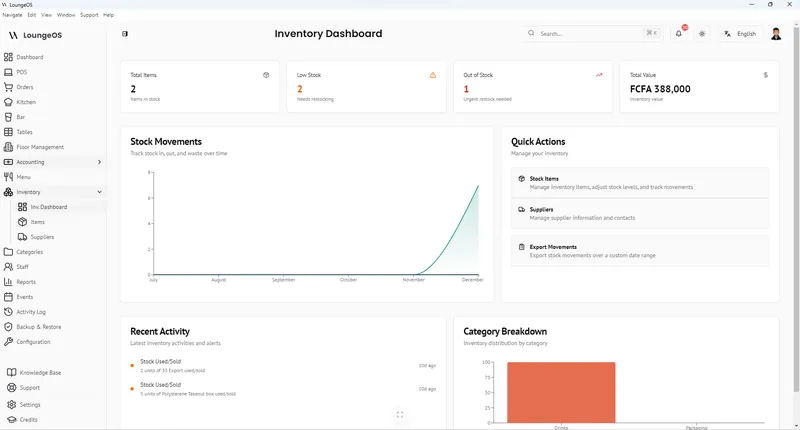
Every sale comes off stock. Deliveries, losses and corrections are recorded, with low-stock alerts.
Mobile money and cash
Cash with change shown, MTN Mobile Money, Orange Money, card or your own methods, and split payments.
Cancels need a manager
Voids, refunds and price changes need a manager's PIN, and the activity log shows who did what.
Keeps selling offline
The Windows and Mac tills keep checking out without internet and sync when it comes back.
Coming next
- Sell by weight with scale barcodes (fruit, vegetables, meat)
- Batches and expiry dates, with alerts before products expire
- Units and packs: sell a bottle or the whole crate
- Promotions and happy-hour prices
Not in the app yet. We say so here, so you can decide with the facts.
Pricing for supermarkets and groceries
The price of each plan for this kind of business, straight from our price list.
Starter
- 2 users, 2 devices
- Point of sale (POS) for any kind of businessPoint of sale (POS), tables, kitchen and bar screensRooms, bookings and charge to room, with the restaurant and bar tillPoint of sale (POS) with barcode scanning
- Inventory and suppliers
- Customer tabs (pay later)
- Receipts
- Daily reports
Business
- 5 users, 5 devices
- Everything in Starter
- Expenses and accounting
- Weekly and monthly reports
- Shifts and cash control
Pro
- Unlimited users, 10+ devices
- Everything in Business
- Several branches
- All-branches sales overview
- Priority support
- Payroll and payslips
Every plan starts with a 14-day free trial with Business features. No payment up front. Visitors in Cameroon see prices in FCFA, everyone else in US$.
A supermarket POS has to be fast at the checkout, right about stock and strict about cash. LoungeOS does that for mini-markets, groceries, convenience stores and drinks depots. When you choose Supermarket or grocery in the setup wizard, LoungeOS suggests categories such as Groceries, Beverages, Dairy and eggs, Fruits and vegetables, Bakery, Household and Personal care, and hides the restaurant screens you do not need.
A fast checkout
- Scan and go. Plug a barcode scanner into the till, scan each item and it lands in the basket. Typing the code in the search box and pressing Enter works too.
- Find anything. Search by name, filter by category or tap a product’s photo on a touch screen.
- Take the money your way. Cash with the change shown, mobile money, card or any method you create. One sale can be paid with two methods.
- Receipts and drawer. 58 mm or 80 mm thermal receipts or a PDF, and the cash drawer opens after a cash sale.
Stock you can trust
Every product sold comes off the stock count. Deliveries from suppliers, damaged goods and corrections are recorded as stock movements with a name and a time. Low-stock alerts tell you what to reorder before the shelf is empty, and products that run out are greyed out at the till. See inventory management.
Every till accounted for
Each cashier signs in with their own account and switches on a shared till with a quick PIN. Cancels, refunds and price changes need a manager. The daily sales report shows the takings by payment method, and you can check it from anywhere in the web app or the phone app. More in loss prevention.
Several shops
Each shop is a branch with its own stock and team. The Pro plan shows all branches’ sales side by side. See multi-branch.
Run your shop on LoungeOS
Create your account, answer the setup wizard and your business is ready on day one. Try it free for 14 days with Business features. No payment up front.
What LoungeOS does not do yet
LoungeOS works today for shops that sell packaged goods by the unit. Products sold by weight, batches and expiry dates, and selling a single bottle or a whole crate from the same product are being built now and listed under Coming next above. If you run a fresh counter or need expiry tracking on day one, tell us before you choose.
Frequently asked questions
Which barcode scanners work with LoungeOS?
Any USB or Bluetooth scanner that types the code like a keyboard, which is most scanners sold for shops.
Can I use several tills at the same time?
Yes. Starter covers 2 devices, Business 5 and Pro 10 or more. Every till sells into the same stock and the same reports.
Can I sell fruit and vegetables by weight?
Not yet. Selling by weight with scale barcodes is coming in the next update. Until then you can sell fixed packs, for example “Tomatoes 1 kg”.
Does it track expiry dates?
Not yet. Batches and expiry dates with alerts are coming in the next update.
Does it keep working without internet?
Yes, on the Windows and Mac apps. Sales are saved on the till and sync when the connection comes back. See offline POS.
Run your shop on LoungeOS
Create your account, answer the setup wizard and your business is ready on day one. Try it free for 14 days with Business features. No payment up front.
Explore more
Best supermarket POS
Barcode checkout, several tills, stock and cash control compared.
Read guide →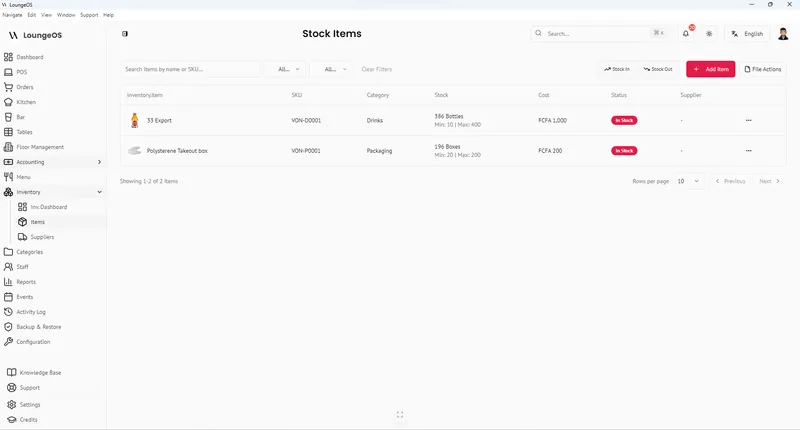
Inventory Management
Stock levels, low-stock alerts, suppliers, waste and damage logging, CSV import and export.
Learn more →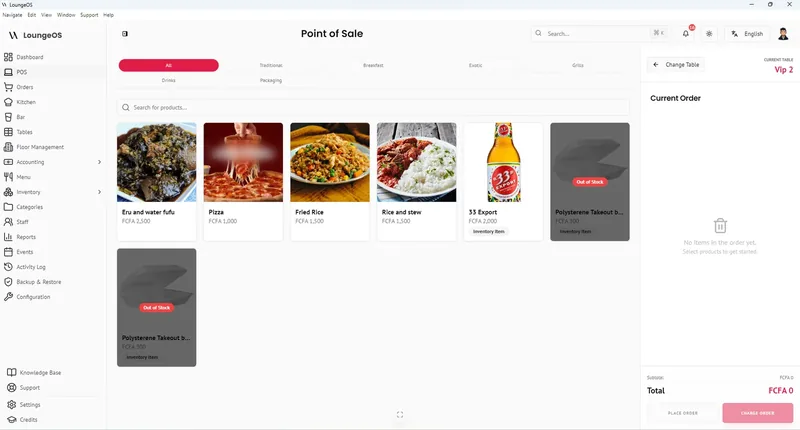
Offline POS
Windows and Mac tills keep selling without internet, with phones on your Wi-Fi, and sync when the connection comes back.
Learn more →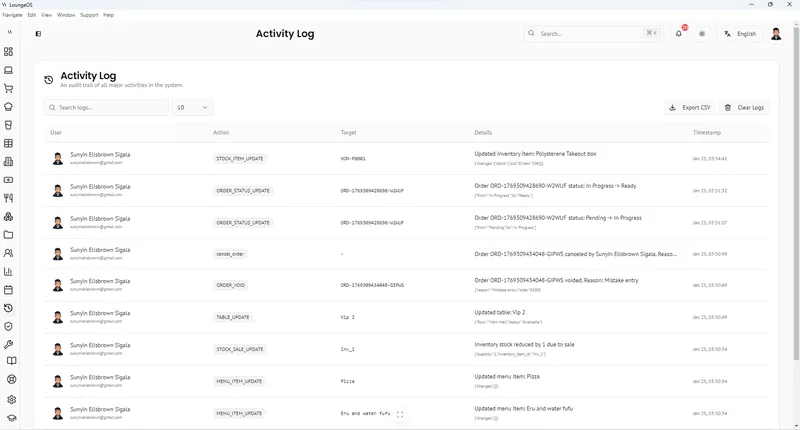
Loss Prevention & Audit Log
Staff roles and permissions, manager-only edits, cancellation reasons and a searchable activity log.
Learn more →