In this guide
Table management covers everything between “a guest walks in” and “the table is ready for the next guest”: where tables are, who serves them, what state they’re in and how long each stage takes. Small improvements here add up to more covers per night without adding a single seat.
1. Design the floor plan around movement
Before you think about software, walk the room:
- Clear paths from the kitchen pass and the bar to every section, without crossing the entrance queue.
- Table mix that matches your guests: if most groups are couples, too many 6-tops waste seats. Movable 2-tops that combine are the most flexible.
- Zones with different experiences: main room, terrace, VIP, bar counter. Price and staff them differently.
- Safety: emergency exits and passages kept clear, always.
2. Create waiter sections
A section is a group of tables served by one waiter. Sizing guidance:
- Typical full-service: 4–6 tables per waiter, depending on menu complexity and table size
- High-volume bar or lounge: more tables with runners helping
- VIP or bottle service: fewer tables, more attention
Rotate sections fairly, so the best section isn’t always the same person’s, and put new staff in quieter sections.
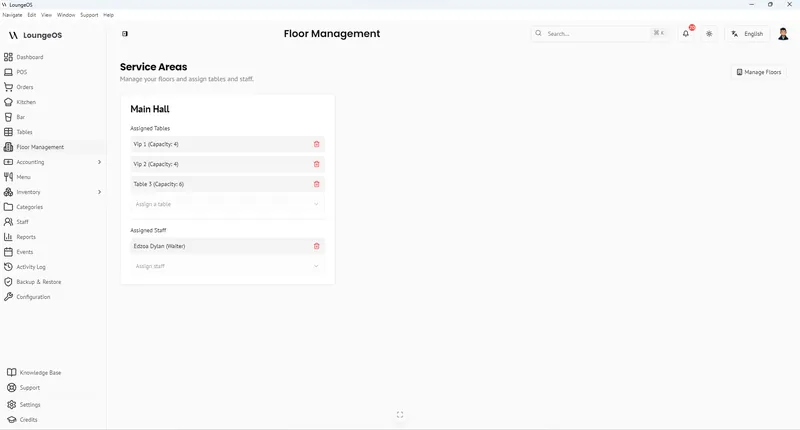
In LoungeOS you create floors (service areas) and assign waiters to them. A waiter only sees their floor’s tables on their phone, which keeps screens simple and responsibility clear.
3. Track live table status
| Status | Meaning | Who changes it |
|---|---|---|
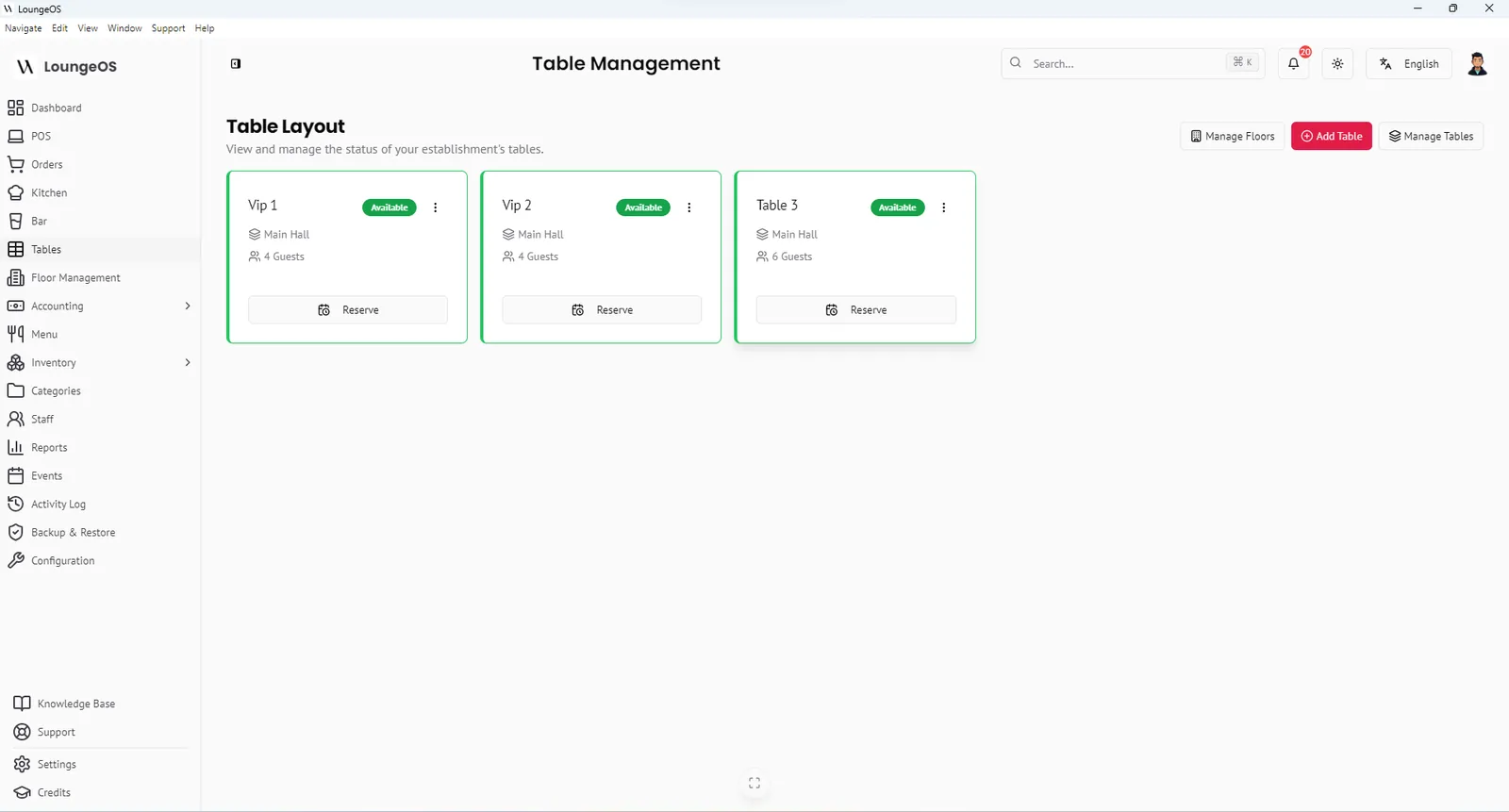
| 🟢 Available | Clean and ready | Automatic when the bill is paid |
| 🔴 Occupied | Has an active order | Automatic when an order is placed |
| 🟠 Reserved or cleaning | Not ready for walk-ins | Host or manager |
With live status visible on every device, the host doesn’t need to walk the room to find a free table, and waiters see at a glance which tables have open orders.
4. Measure turn time
Turn time is the time from seating to the table being ready again. Break it into stages:
- Seat → order taken
- Order → food served (kitchen ticket time)
- Served → bill requested
- Bill requested → paid
- Paid → table cleaned and reset
The slowest stage is usually 3 or 4: guests waiting for the bill, or waiting for change. Fixes: take payment at the table on a phone, record mobile money quickly, and have runners reset tables.
Table turnover = parties served ÷ number of tables (per service)
5. Handle reservations and walk-ins
- Mark reserved tables in advance so walk-ins aren’t seated there.
- Keep a waitlist with names and phone numbers for busy nights.
- Hold a reserved table no longer than your policy (for example 15 minutes) and communicate it at booking.
6. Split and merge bills without losing money
Groups change: separate bills for eight friends, or two tables joining. These are moments where money goes missing if anyone can move items around.
- Split by moving selected items to a new order on another table.
- Merge by combining two tables’ orders and freeing the source table.
- Split payments let one bill be paid with several methods.
In LoungeOS splitting and merging are manager-only, so a waiter can’t quietly move items off a paid bill. See table management features.
7. Communicate with the kitchen
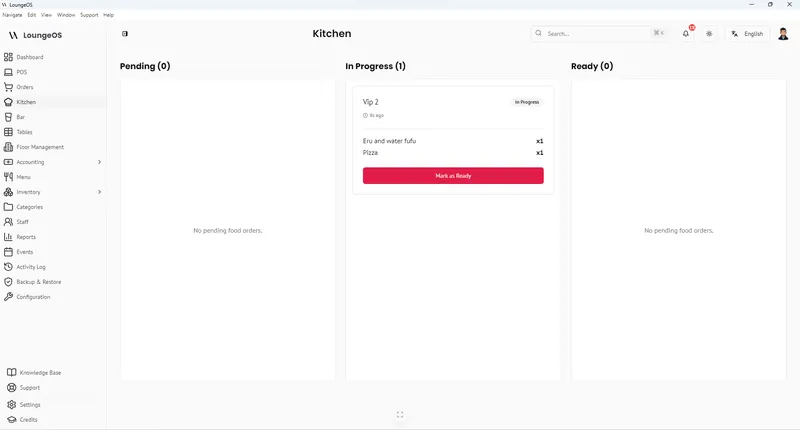
Table management doesn’t end at the dining room door. Orders from each table should reach the kitchen and bar instantly, and waiters should know when food is ready. A kitchen display with ready alerts removes the “is table 7’s food ready?” trips.
Table management checklist
- ☐ Floor plan with zones and clear service paths
- ☐ Tables numbered clearly, matching the POS
- ☐ Sections defined and assigned per shift
- ☐ Live table status on every waiter’s device
- ☐ Reserved tables marked before service
- ☐ Payment at the table to shorten the bill stage
- ☐ Manager approval for splits and merges
- ☐ Weekly review of turn times by section
Run your next service on LoungeOS
Install LoungeOS on a Windows computer, connect your tablets and phones over Wi-Fi, and run real service for 30 days. Free, no credit card.
Frequently asked questions
What is table management in a restaurant?
It’s the system for organising tables, sections, seating, table status and bills, so guests are seated quickly and every table’s orders and payments are tracked accurately.
How many tables should one waiter handle?
Commonly 4–6 tables in full-service restaurants, depending on table size, menu complexity and whether runners help. VIP and bottle service sections usually have fewer.
How can I turn tables faster without rushing guests?
Shorten the waiting stages: take orders promptly, use a kitchen display to cut ticket times, bring the bill quickly, take payment at the table, and reset tables immediately.
Can waiters see only their own tables in LoungeOS?
Yes. Assign waiters to a floor, and their device shows only that floor’s tables.